
AI and Its Impending Doom (?)

Recently, Jacob Coxon, a safety researcher who resigned from Anthropic in September 2026, said that both Anthropic and Open AI were “gambling with our lives” by racing toward self-improving superintelligence. He warned that there is a strong chance unchecked progress in artificial intelligence could lead to human extinction by the end of this decade.

The “self-improving superintelligence” part immediately reminded me of a fictional story I read recently called My Friend Aaron by Rory McMeekin (Google it). It was published in August, and it has all the elements of a Black Mirror short story. After reading Coxon’s recent comments about AI safety and superintelligence, that story feels almost uncomfortably real.

As someone who has been working for 15+ years in IT and now uses AI extensively for research, work, and fun, I can understand why many people aren’t taking these warnings from AI experts too seriously. Millennials have heard similar criticisms before, although about different technologies.

A few years back, AI for me at work basically meant Grammarly. It would automatically detect and correct my grammar mistakes. But there was almost a sense of guilt attached to using it, especially with so many people online shaming those who relied on writing tools. Apparently, if we are writers, we should get everything right on our own.

But I am someone who is much more comfortable thinking quickly and writing as I think than writing slowly, consciously, and perfectly. So I found Grammarly to be the perfect companion. It would catch my mistakes when I was speeding up my writing. Yet I still felt like I was doing something wrong by using the app.

It was only after ChatGPT came along that using Grammarly somehow became the lesser sin.

Now, people say, “Don’t use ChatGPT. Use Grammarly for writing and correcting small mistakes.”

If we look at the history of technology, I think this has always been the norm. A new product or technology arrives, people criticize it, and there are predictions about how it is going to ruin society or even end humanity. We saw it with the internet. We saw it with computers. And now we are seeing it with artificial intelligence.

Then something newer and more powerful comes along, and the technology that was previously considered controversial suddenly becomes normal.

I wonder if online AI bots will eventually achieve the same acceptance when something even more advanced comes along. Maybe that will be robots that look and speak like humans. Maybe it will be something we can’t even imagine yet.

Only time can tell.

Technology is definitely moving at a pace that I couldn’t have imagined a few years ago. Things that seemed like science fiction are becoming part of everyday life, and the conversation around AI is changing almost as quickly as the technology itself.

I don’t think banning AI is the answer. AI tools are helping many people, including me, speed up their work and get things done more efficiently. At the same time, I understand the criticism that AI can also make people lazy.

The problem is not using AI itself. It is how we use it. There is a big difference between using AI as an “add-on” to your work, something that helps you speed up what you already know, and using it as a complete replacement for your own knowledge and thinking.

Where that line should be drawn is something technology experts will have to figure out. And, as ordinary users, it is something we will only understand better as AI continues to evolve.

***

Photo by Pavel Danilyuk
An Ode to the Most Underrated Career Skill

Googling.

Before you laugh, hear me out.

How is Googling a skill? Anyone can search on Google, right?

Yes, but not everyone does. Why? Because most people do not like to research or read.

In the tech industry, many of the answers are easily available online. Just a search away. It is very rare that you are the first one to face an issue. For a lot of coders, Stack Overflow is like a second home.

Whichever industry you are in currently, Googling is a good skill to have. It is right there, all the details, 24×7, for free. If you are able to research and find out an answer on Google for most of your problems, then in my opinion, that IS a skill. To learn more, to be self-reliant, without being overly dependent on others, is a skill.

Even if you get help from someone, you should STILL Google about it to learn more. Most people are too busy to get into in-depth teaching. They will just touch the topic at a high-level. I always make it a point to do some Googling when someone offers me a solution. It has helped me a lot in building on my base knowledge.

Why Do So Many People Dislike Googling?

People are hesitant to Google for an answer even if it is much easier than waiting for an answer from someone.

We are all naturally lazy (including yours truly). We just want all the answers to come to us without effort. We like to be spoon-fed without lifting a finger (even if it is for a search engine that automatically does the rest of the work for you). But growth happens (as cliché as the next line might sound) – “outside our comfort zone.”

I realized many people are bad at Googling when I posted snippets of some random articles on my Instagram story (with the title, website name et all), and my friends still asked me for the link instead of searching on Google using the article name. Mind you, to provide them the article link, I had to go through the exact same steps – search using the article name on Google, copy the URL and paste it on our chat. I did not have the link stored anywhere for easy access.

It continues even today.

Even after explaining to them how to search on Google.

I am not a passive aggressive type, so I find it difficult to use the infamous “sure, let me Google that for you” when someone asks me something that can be easily Googled.

Some Neat Googling Tips & Tricks

Most of the time, we can get what we want by just entering the search query on Google.

But what if we want something extra?

Well, for the curious cats, here are some cool Google search tips and tricks you can use to get a desired result.

  • Double Quotes

My most favourite.

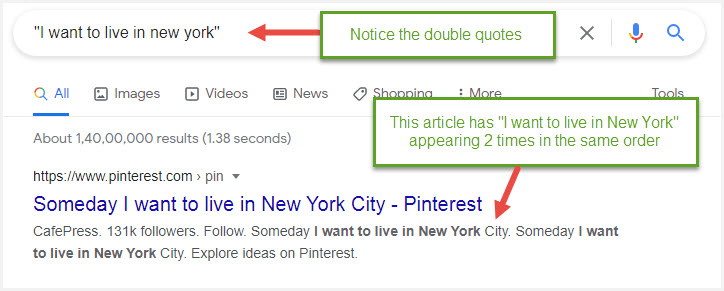
Use double quotes if you want the exact phrase in the same order to appear in your search results.

For example, “I want to live in New York” will give results where the phrase appears in the exact same order.

Remove the quotes, and you will have the keywords scattered all over the article, and not exactly in the same order.

Using double quotes is also a great way to search for articles using just their titles.

In the example below, I want to search for posts that have mentioned “I want to live in new york” in the exact same order.

Using Double Quotes to Search for the Exact Phrase on Google
  • Define

Defines a word and also includes an audio clipping on how to pronounce it correctly.

Use Define: followed by the word.

Use Define: to Find Out How a Word is Defined and Pronounced
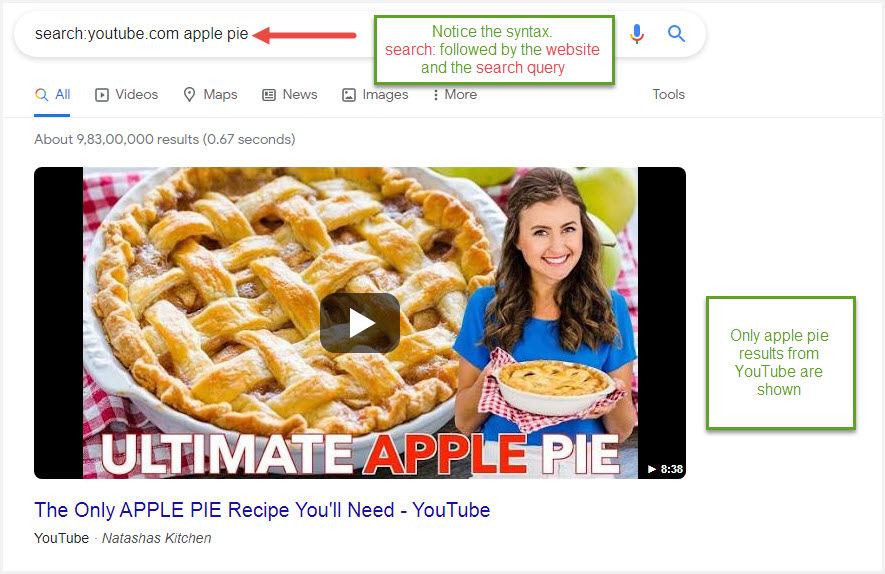
  • Search

Searches for results on a specific site.

Use Search: followed by the website URL and search query.

In the example below, I want to search all recipes for apple pie on YouTube.

Use Search: to View Search Results from a Specific Site
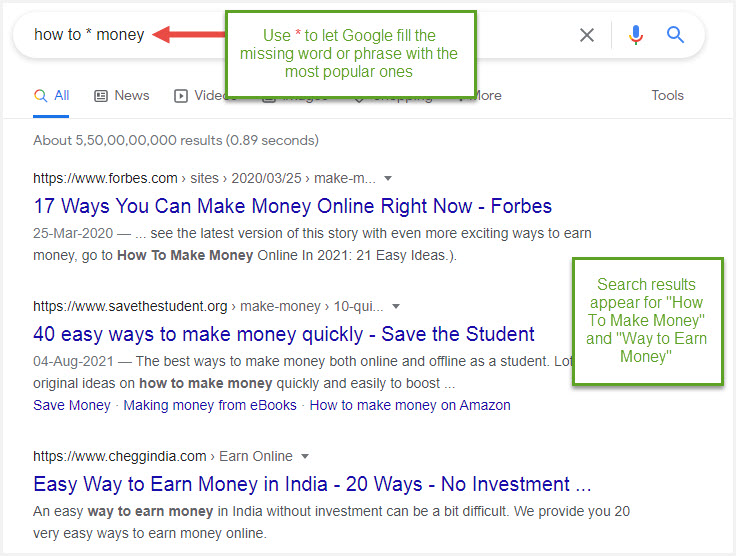
  • Asterisk *

Use the * asterisk symbol to let Google do the guessing work. This allows you to see the most popular search phrases that match a part of your query.

Insert * wherever you want Google to add in the most popular search words/phrases. In the example below, I have used how to * money, so it will consider popular search phrases like how to make money, how to earn money etc.

Use Asterisk (*) to Search for Missing Words
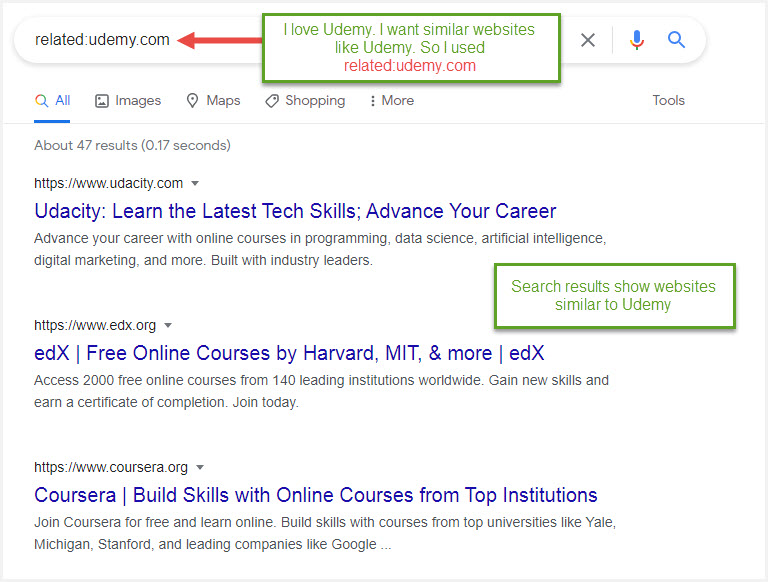
  • Related

If you find a website you really like, and wish to see similar ones, use Related: followed by the URL of the website you liked.

In the example below, I want websites similar to Udemy that offers courses online.

Use Related: to Find Related Websites
  • Tilde ~

This is a great way to include synonyms.

Use ~ before the word that requires synonyms.

Use Tilde (~) to Find Synonyms
  • Location-specific

If you wish to see search results only related to a specific location use location: after the search phrase.

Use Location: to Find Specific Location Results
  • File Type

In case you are looking for content in a particular format, use filetype: followed by the type of file (example: pdf).

Use Filetype: to Search for Specific Formats
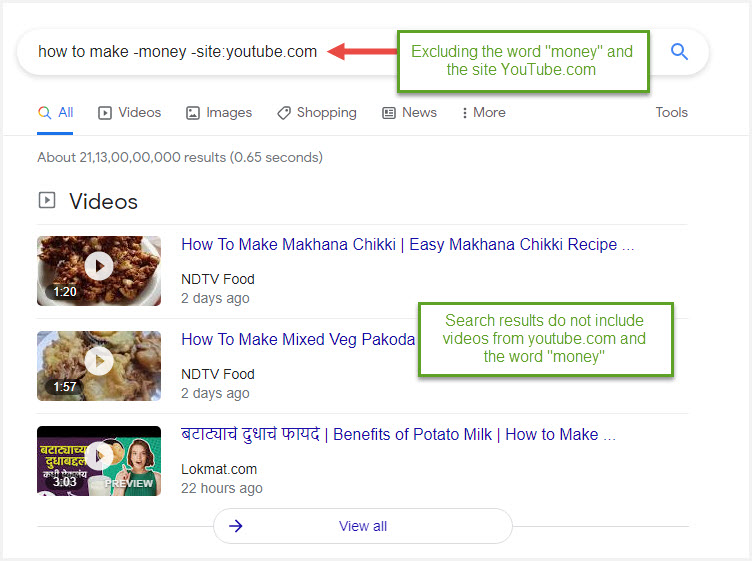
  • Exclude

Exclude something from search results by using dash .

For example, let us consider the example below, when you type -money, this means you want Google to exclude the word “money” from the search results. I have additionally added another exclusion, that is the website YouTube.com.

Exclude Certain Words & Sites from Results (Potato Milk?! You learn something new everyday :))